TwinSpin Support
This page provides basic troubleshooting, frequently asked questions, and contact details for TwinSpin.
Contact
If you need help with TwinSpin, contact us at: support@obryza.com
Please include your device model, iOS version, and a short description (or a screenshot) of the issue.
Basic troubleshooting
1. The app feels slow or unresponsive
- Close other apps running in the background.
- Restart your device and try launching TwinSpin again.
- Make sure you are running the latest available version of iOS.
Performance settings
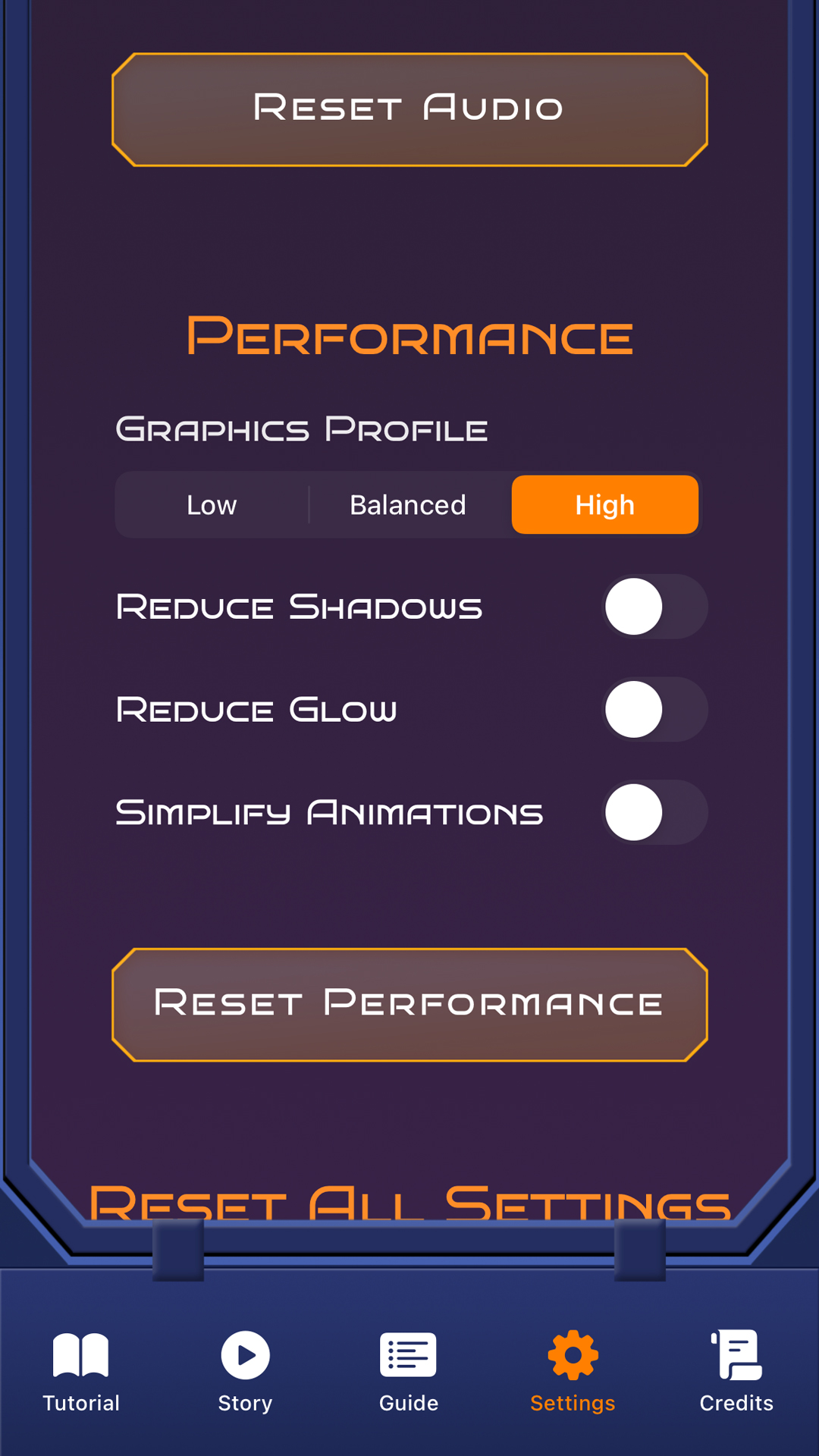
TwinSpin includes a built-in performance settings page that allows you to lower visual effects for smoother gameplay on older or less powerful devices.
- Open the in-game inventory menu.
- Go to Settings → Performance.
- Select a lower graphics profile (Low or Medium).
Lowering the graphics quality reduces visual effects and can significantly improve performance.
2. Gesture / touchless controls are not detected
- Ensure the camera permissions are allowed for TwinSpin.
- Play in a well-lit environment so the camera can detect your hand clearly.
- Hold your hand within the visible area above the device as indicated in the tutorial.
3. Purchase of Star bundles does not appear in-game
- Check that you are signed in with the same Apple ID you used for the purchase.
- Ensure you have a stable internet connection.
- Use the “Restore Purchases” option in the app, if available.
- If the issue persists, contact us and include your Apple receipt details if possible.
Frequently asked questions
Does TwinSpin collect personal data?
TwinSpin uses the device camera for hand tracking to enable touchless controls. Camera processing happens on-device and is not used to personally identify you. For details, see our Privacy Policy.
How do Stars and the StarShop work?
Stars are an in-game resource that you can earn by playing or optionally purchase via in-app purchases. You can spend Stars in the StarShop on shields, energy boosts and other gameplay-related upgrades. Stars have no monetary value and cannot be exchanged for real-world currency.
What is OB progression?
OB is an optional progression score linked to your Obryza account. It is used only to track certain in-game achievements (such as end-boss victories), has no monetary value, cannot be traded and cannot be withdrawn.
Legal & privacy
For more details about data handling, in-app purchases, and user rights: